By
By Thanks to the rise in visual and video content on social media, many graphic design tools have become available online. There are plenty to choose from, but until recently, there was one stand-out favorite.
Due to its customizable templates and easy-to-use interface, Adobe Express has been the go-to tool for graphic designers since 2015.
However, Adobe Express has many limitations on premium tools and features. Plus, not everyone wants the same features from a design software package. It has led to an increase in people looking for Adobe Express alternatives.
So, if you’re looking for a way to create new and original designs, we’re here to help! In this guide, let’s explore the 10 best Adobe Express alternatives to help improve your design experience.
What is Adobe Express?

Source: Unsplash
Adobe Express, also known as Adobe Spark, is a versatile design tool that enables you to create graphics, web pages, and video stories effortlessly. With its user-friendly interface and a plethora of templates, Adobe Express has become a go-to solution for individuals and businesses looking to enhance their visual content.
Adobe Spark vs. Adobe Express
Adobe Spark has been rebranded as Adobe Express. Launched in 2016, Adobe Spark offered a suite of mobile apps for creating social media graphics, short videos, and web pages. It was known for its user-friendly interface and focus on quick and easy design creation.
However, in 2021, Adobe decided to unify its design offerings under the Adobe Express brand. This brought together the functionalities of Spark with additional features and a more comprehensive design platform. Essentially, Adobe Express is the evolution of Adobe Spark, offering a broader range of tools and capabilities while retaining the core strengths of its predecessor.
Bonus: Canva vs Adobe Spark: Which Is the Best Choice for You?
Reasons to Seek Adobe Express Alternatives
Below are the most common pain points that push users to try different platforms according to G2 reviews on Adobe Express.
1. Interface Feels Packed
Adobe Express places many tools, layers, and menu options on a single screen. New users often struggle to understand where to begin. When they open a template or create a blank project, the number of icons can feel overwhelming. Instead of guiding users through a clear path, the interface asks them to make decisions at every step, which leads to confusion and slower progress.
2. Slow Progress for Simple Tasks
A simple task—like resizing text, placing an image, or changing a background—often requires several clicks. Users must navigate through side panels, dropdowns, and settings to complete basic actions. This slows down workflow and makes the tool feel heavier than expected. When someone wants to finish a quick post for social media, these extra steps can feel unnecessary.
3. Not Beginner-Friendly Tools
Many features inside Adobe Express work best for people who already understand design concepts. Beginners may not know which adjustment affects which element. They might add effects or layouts without knowing how to return to the previous step or how to fix alignment. This creates a sense of frustration, especially for users who prefer straightforward solutions over tools that demand prior knowledge.
4 Templates That Require Adjustments
Although Adobe Express offers a collection of templates, many users find that these layouts require extra editing before they match the purpose of their project. Colors, spacing, and text placement often need manual adjustment. For a beginner, these edits can feel time-consuming. Instead of speeding up their work, templates sometimes add another layer of complexity.
5. Limited Comfort for Small Businesses
Small business owners usually care about two things: saving time and producing clear, consistent content. Adobe Express makes this difficult because its tools and structure often demand more steps and more editing time. Students and freelancers face the same issue. They want a design process that helps them complete tasks quickly, yet Adobe Express often slows them down due to its multi-step workflow and busy interface.
Here are a few reviews from Adobe Express users:
“The actual user experience of using Express often makes it fall short of competitors. Interface issues (especially on tablets) and having less variety of features have caused me to avoid Express unless necessary.” By Noah W.
Source: G2
“Limited Free Features many templates and Fonts are Locked in the free version. if you want to Create Advanced Designs ,you need a premium Subscription. it take time to load designs in poor networks. lag and performance issues.” by aditya t.
Source: G2
“Unlike Photoshop or other apps, adobe express doesn’t offer advanced editing features such as detailed layer control, complex masking, or professional grade typography and video editing. The free plan has restrictions like limited templates, stock resources, and cloud storage. Some exports may include an Adobe watermark which can be frustrating sometimes” By Herry D.
Source: G2
Bonus: Canva Alternative: 7 Better Options for Marketing Teams
Key Factors to Consider When Choosing an Adobe Express Alternative
Source: Unsplash
- Evaluate the specific features you need, such as advanced editing tools, animation capabilities, or social media scheduling.
- Consider your design experience and choose a platform with a user-friendly interface and learning curve.
- Compare free and paid plans to find one that fits your budget and usage needs.
- Ensure the platform allows for enough customization to maintain your brand identity.
- If collaboration is crucial, check for features that facilitate teamwork and sharing within the platform.
The 10 best Adobe Express alternatives are,
1. Simplified

Simplified stands out as a strong option for anyone who feels slowed down or confused by Adobe Express. Many users look for a tool that offers a cleaner layout, easier controls, and faster project completion. Simplified meets these needs by offering a workspace that feels clear from the moment you open it.
Unlike Adobe Express, Simplified does not overwhelm users with packed menus or too many steps. The dashboard focuses on the essentials, which helps beginners understand where every tool is and how to use it. This makes it far easier for students, small business owners, and creators to start designing without long learning sessions.
Adobe Express offers a free plan, but many features are locked behind a paid subscription. Simplified’s basic plan is free forever and includes powerful AI tools. You can create headlines with its AI writer and generate images from text using the AI image generator.
Remove backgrounds, create animations, and resize photos with a single click! Plus, access Simplified in-app publishing and scheduling feature to create and distribute all of your content on the same platform.
Simplified also has 1000s of built-in templates that make your content creation a breeze. You can find a perfect template for any occasion. It has thousands of font styles and design elements to choose from. With their extensive resource collection, which contains millions of pictures, you can easily edit templates.


In short, Simplified is a powerful Adobe Express alternative. Try it today and get ready to create an impact with powerful designs and videos.
Pricing: Simplified offers a Free Forever plan with all the basic features. However, the Pro plan starts from $15 per month with all the advanced features.
Bonus: 5 Epic Ingredients For A Successful Social Video Marketing Strategy
2. Canva
Canva is a well-known online design tool used by beginners, small teams, and creators. It provides thousands of templates for social posts, documents, videos, posters, logos, invitations, and more. The platform also includes a large library of photos, icons, elements, and fonts that help users create designs with ease.
Canva works in a browser and also has apps for desktop and mobile devices. It allows users to work on presentations, short videos, and marketing graphics without requiring advanced skills.
Cons
- Many premium templates and elements require a paid plan.
- Some tools become slow when working on heavy projects.
Pricing: The paid plan starts at around $45 per month. Canva’s free plan is decent, but the paid plan includes more features, assets, and export options.
Bonus: Canva Alternative: 7 Better Options for Marketing Teams
3. BeFunky
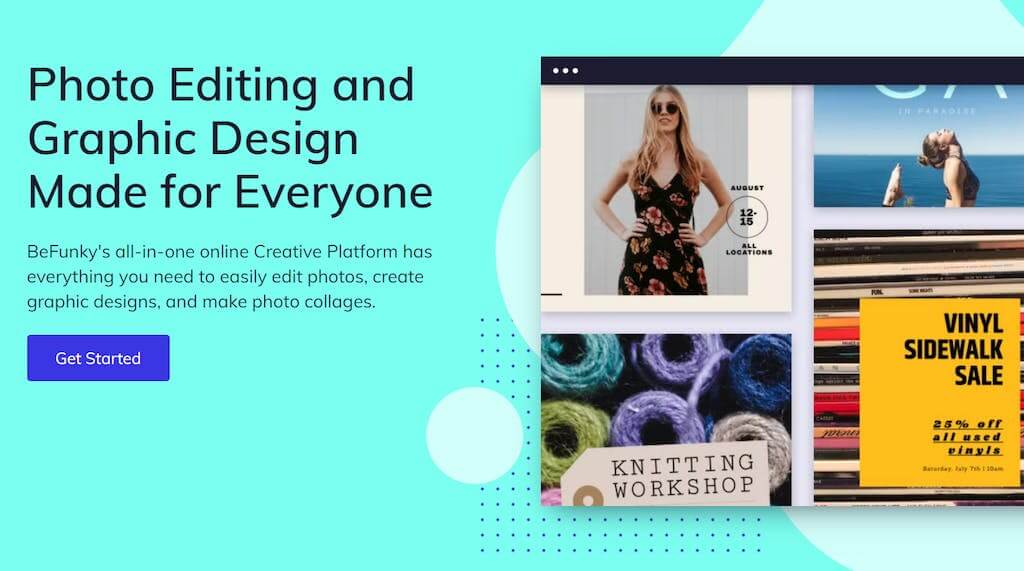
BeFunky is one of the best graphic design tools for creating digital advertisements and posts for social media. It includes a free media library with photographs, vector illustrations, and a few other assets. It has filters, a photo collage tool, and lets you publish directly to your social media channels.
Cons
- The free version of BeFunky is limited and full of advertisements referring you to BeFunky Pro.
- It’s only a good fit for individuals with previous graphic design experience.
Pricing: The paid plan starts at $6.99 and is quite a great Adobe Express alternative. The paid plan has more features like the intuitive One-Click Image Enhancer and the Collage Wizard.
4. Snappa

Snappa is another excellent Adobe Express alternative that you can try. This tool helps to make social media graphics, blog post photos, digital banners, and more. It has a built-in collection of millions of stock images, typefaces, themes, and design components and is easy to use.
Snappa is web-based and works on a PC or Mac. However, there is no app available for smartphones or mobile devices. Still, it is decent for inexperienced social media marketers and bloggers who don’t mind working on a desktop.
Cons
- It does not work on smartphones or mobile devices.
- It may not be the best option for high-end creators because of the basic plan.
Pricing: The Pro plan of Snappa starts at $10 per month.
Bonus: The Best Alternative to Snappa: Simplified (Free forever) vs Snappa ($120 Paid Annually)
5. Desygner

Desygner is an online design tool built for beginners and teams that want simple design options. It includes templates for social posts, banners, posters, ads, flyers, and business cards. Users can drag and drop elements, edit text, and export designs easily.
Desygner also supports file import, making it easier for users to edit PDF layouts.
Cons
- Some templates look repetitive.
- Performance can slow down on older devices.
Pricing: The Pro+ plan starts at $3.14 per month.
6. RelayThat
Source: RelayThat
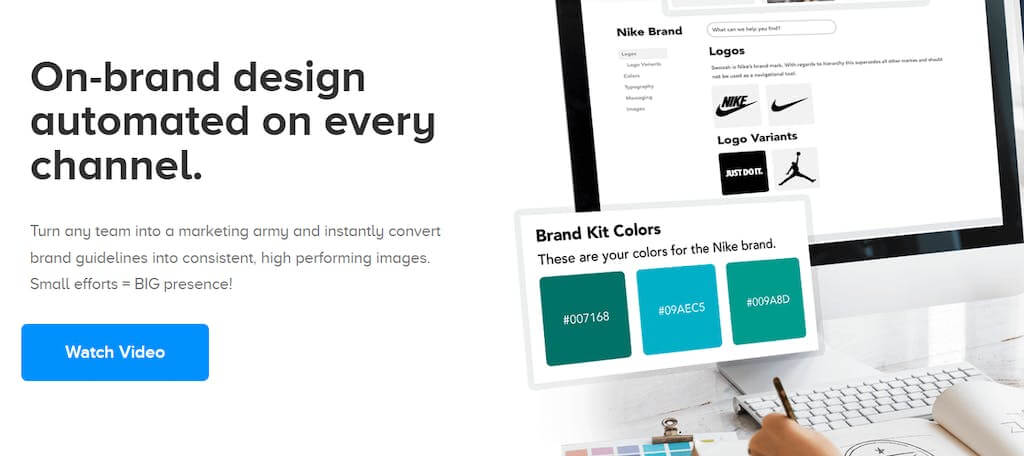
RelayThat is a great Adobe Express alternative for firms that don’t employ an in-house designer. It allows you to generate visuals for blog articles, social network accounts, banners and postings, posters, and other purposes.
You get a wide range of templates you can edit to your liking by adding your own logo and brand colors. You can also add stock pictures, fonts, and graphics from their collection and quick image fixes like filters and effects. RelayThat allows you to work with other team members and save your custom settings to use them in subsequent creations.
Cons
- It is not the most budget-friendly.
- It does not have the option to resize to a custom resolution.
- Editor options like changing line spacing, text height, etc., are limited in this tool.
Pricing: The Pro plan starts at $15 per month.
7. Fotor

Source: Fotor
Fotor is a graphic design tool that includes one-click filters, photo effects, and templates for social media images and canvas design. You can also find interesting, personal-project-related features like a collage maker. It’s a simple resource for quick image adjustments and social post images. It is available on both the web and mobile apps for iOS and Android.
Fotor is a good option for photographers who wish to edit and advertise their photographs swiftly. However, it is not ideal for professional designers as they may be looking for more features.
Cons
- The free version is constantly bombarded with ads which can be distracting.
- The free version has limited features.
- There are no ready-to-use templates.
Pricing: The pricing for Fotor starts at $3.99/ per month.
Bonus: The best free alternative to Fotor: Simplified vs. Fotor
8. Pablo by Buffer
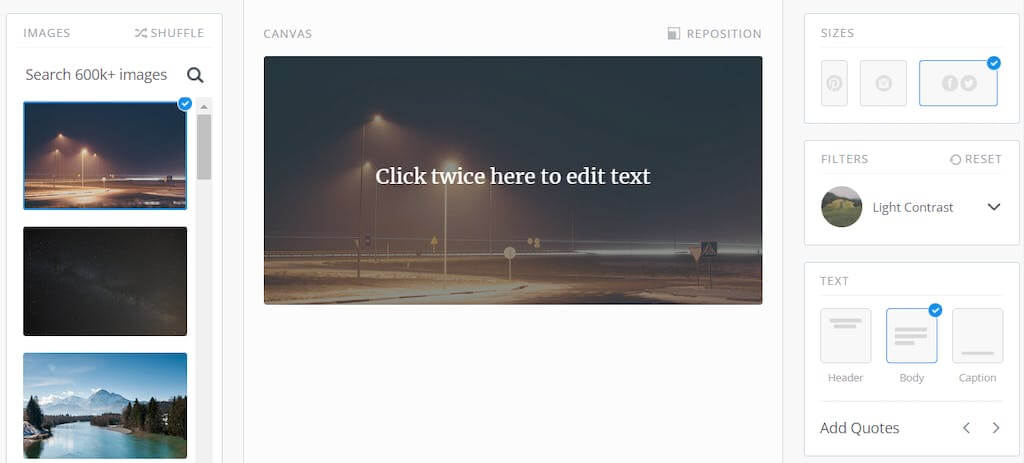
Pablo by Buffer is a free graphic design tool that can help you create stunning content in less than 30 seconds. It is a web-based solution, but you can also download a Chrome plug-in. Pablo is particularly popular among entrepreneurs and influencers. This application has a large library of stock photos that you can use to customize a design template of your choice.
Above all, Pablo values simplicity. However, it also means the editor has limited options in terms of templates, typography, picture style, and scaling.
Cons
- Advanced design editing features are missing with this free tool.
- The design options are limited in terms of sizes, text placeholders, and filters.
Pricing: Free
9. Design Wizard
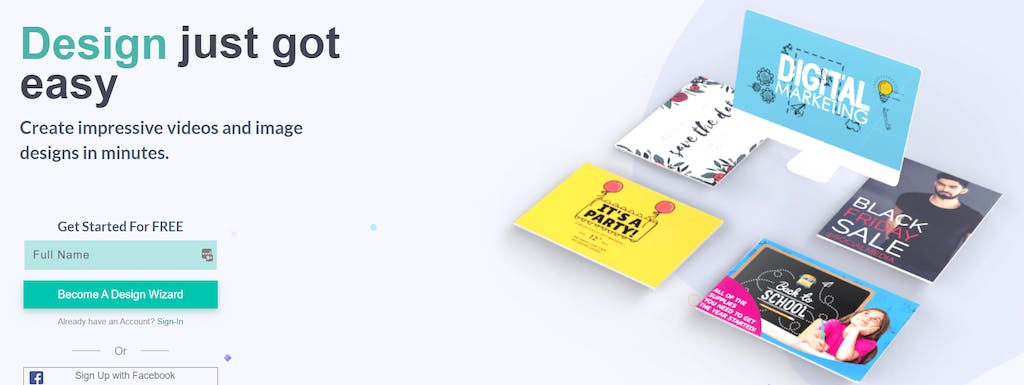
DesignWizard is the perfect Adobe Express alternative for beginning graphic designers. With an easy-to-use interface and no upfront costs, it’s the perfect choice for those who want to get started in design.
DesignWizard gives you access to a large database of images, as well as over 10,000 free templates; plus, you can quickly create custom ones. However, the best features are only available once you upgrade to the paid version.
Cons
- Many advanced design features are missing.
- It is expensive for beginners.
Pricing: The Pro plan of Design Wizard starts at $9.99 per month.
10. PicMonkey

PicMonkey is a solid tool for photo editing, ads, banners, and social posts. It includes features like retouching tools, color adjustments, textures, and simple design elements. The platform also allows users to create branded content for small businesses.
It works well for quick projects that require clean edits and simple adjustments.
Cons
- The free version is extremely limited.
- Exporting designs usually requires a paid plan.
Pricing: The paid plan starts at $7.99 per month.
Adobe Express Alternatives: Side-by-Side Comparison
| Tool | Best For | Main Cons | Pricing |
|---|---|---|---|
| Simplified | All in one AI tools, Fast design, clear workspace | Some advanced tools require upgrade | Free Forever; Pro from $15/mo |
| Canva | Social posts, videos, presentations | Many premium assets; can slow on large files | From $45/mo |
| BeFunky | Social ads, collages, quick edits | Free version has ads; better for skilled users | From $6.99/mo |
| Snappa | Blog images, banners, social graphics | No mobile app; basic for pro creators | From $10/mo |
| Desygner | PDF edits, business cards, simple designs | Some templates look repetitive | From $3.14/mo |
| RelayThat | Brand-consistent designs for teams | Limited layout freedom | From $15/mo |
| Fotor | Photo edits, filters, collages | Ads in free plan; limited templates | From $3.99/mo |
| Pablo by Buffer | Quick simple posts | Very limited editing options | Free |
| Design Wizard | Starter-friendly templates | Advanced tools missing | From $9.99/mo |
| PicMonkey | Retouching, social graphics | Free plan restricted | From $7.99/mo |
The Only Adobe Express Alternative You Need!
While there are plenty of Adobe Express alternatives out there, Simplified is the best when it comes to modern content requirements. This all-in-one design tool is specially designed to cater to all your needs related to content in one place. You can create awesome graphic designs and excellent copies for your ads. You can even create and edit videos and publish your content online.
Simplified is the fastest and easiest tool to help you begin your content creation journey. You can add more team members and manage your projects from one place as you grow. It is the best design and content platform and an excellent project management tool!



![10 Best AI Image Restoration Tools to Try in 2025 [Free & Paid]](https://siteimages.simplified.com/blog/Best-AI-Image-Restoration-Tools-01.png?auto=compress&fit=crop&fm=png&h=400&w=400 "10 Best AI Image Restoration Tools to Try in 2025 [Free & Paid]")
![How to Use Photoshop AI Generative Fill Feature [2025]](https://siteimages.simplified.com/blog/How-to-Use-Photoshop-AI-Generative-Fill-01-1.png?auto=compress&fit=crop&fm=png&h=400&w=400 "How to Use Photoshop AI Generative Fill Feature [2025]")
![20 Podcast Thumbnail Ideas to Boost Your Show’s Visual Appeal + Best Practices [2025]](https://siteimages.simplified.com/blog/Podcast-Thumbnail-Ideas-to-Boost-Your-Show-02-1.png?auto=compress&fit=crop&fm=png&h=400&w=400 "20 Podcast Thumbnail Ideas to Boost Your Show’s Visual Appeal + Best Practices [2025]")