By
By AI writing tools have become a regular part of content work for businesses, creators, and teams. As more platforms enter the market, people often compare them to find better prices, smoother workflows, and wider features. Jasper is one of the well-known tools in this category, yet many users on Trustpilot and G2 mention concerns that lead them to look for other options.
Since the needs of writers vary, a detailed comparison helps readers decide which platform suits their tasks and budget. This guide reviews five practical alternatives to Jasper and breaks down their features, pricing, and overall user experience. With clear points and direct insights, the goal is to help readers understand what each tool does well and where it may fall short.
To understand why many users consider switching, it helps to look closely at expectations versus real feedback.
Why Jasper Users Are Looking For an Alternative
Many users choose Jasper with the hope of faster writing, smoother workflows, and steady results. The platform highlights benefits such as rapid content creation, strong output, brand consistency, simple plan changes, and reliable support. These points create high expectations, especially for businesses working with tight timelines.
However, reviews on Trustpilot and G2 show a growing gap between what Jasper promotes and what users actually experience. Because of this gap, many subscribers start searching for tools that handle daily writing tasks with fewer interruptions and more predictable results.
Here is some Jasper’s user feedback from Trustpilot and G2:
“Good for some, not for most. It produces paragraphs that make no sense. The platform ended up costing me more time than it was worth to read, pick and then go back and edit everything.” By Verified User in Marketing and Advertising
Source: G2
“High cost, low benefit– The idea of an AI tool that mimics an established brand voice is great, but Jasper does not deliver. I spent a lot of time trying to set it up, attending webinars and watching recordings, and it never gave us anything more than cookie-cutter responses and templates that we could honestly just get for free from other AI tools.” By Andrea R
Source: Trustpilot
“To be truthful, it does not do an effective job in the production of content, and this feels like it may not be that accurate especially when it comes to matters of fact. For me in particular, an instance worth mentioning is that the article was misleading. Fact-checking is a must before using its outtake.” By Munoz C.
Source: G2
“Jasper’s text suggestions are not always accurate or relevant. Additionally, the basic plan of Jasper has limitations, including a restricted number of templates and a character limit of 800 for texts being edited. The Command template feature may also offer limited options for text variants.” By Daria R.
Source: G2
“Makes up quotations- Used Jasper today. I have been short of quotations for an article I am writing. I asked Jasper. Some of the quotes from famous people were completely fictional. They also came with references that were nonsense.” By Mr John Richardson
Source: Trustpilot
After reviewing hundreds of comments, clear patterns appear between what users hoped to get and what they actually experienced.
The Gap Between Promise and Reality
What Jasper Promises
- Faster content production
The platform suggests that users can produce drafts several times faster than manual writing. - Professional-quality writing
Users expect clean, well-structured content that works for blogs, ads, social posts, and website pages. - Brand voice consistency
Jasper promotes tools that help teams keep the same tone across all content. - Simple cancellation
The subscription terms appear straightforward, with the impression that users can leave without trouble. - Helpful customer support
The platform presents its team as responsive and ready to assist.
What Users Actually Experienced
- Unexpected billing issues
Many reviews mention charges after cancellation attempts or added fees that were not clearly explained. - Generic or repeated text
Users say the output often sounds similar across projects, which leads to weak SEO results and more editing time. - Difficult learning curve
Several reviewers note that it takes weeks or even months to understand templates, workflows, and settings before seeing real value. - Slow or absent support
Numerous Trustpilot and G2 comments describe unanswered tickets, long delays, or no resolution at all. - Technical problems
Some users report lost drafts, platform freezes, or glitches during long-form writing sessions. - High cost for limited value
Many reviewers feel that the subscription is priced too high for the quality of the writing and the overall experience.
Key Factors to Consider Before Picking an Alternative
The choice of an AI writing tool becomes simpler when you focus on the factors that matter most in daily work. Since every platform offers different strengths, reviewing these points helps writers decide which tool fits their needs.
Ease of writing workflows
A good platform should feel simple to use from the first draft to the final copy. Clear layouts, quick prompts, and smooth navigation help users complete tasks without confusion.
Content range
Writers often need support for more than one type of content. Blogs, social posts, ads, and emails have different requirements, so an alternative should cover multiple formats without limiting creativity.
Price and value
Subscription plans vary widely. Some tools use credit-based systems, while others allow unlimited writing. It helps to compare what you receive in each plan and how long the plan lasts for real projects.
Extra tools beyond writing
Many creators prefer platforms that include design tools, schedulers, or media options. These additions reduce the need for separate apps and support a more organized workflow.
Collaboration options
Teams work better when they can share drafts, comment on changes, and access the same projects. Strong collaboration features save time, especially for agencies or growing businesses.
Support quality
Reliable help makes a clear difference. When users face issues with drafts, billing, or templates, they need quick responses. Tools with steady support and clear documentation often create better long-term experiences.
These factors offer a helpful starting point before reviewing Jasper’s top alternatives.
6 Best Jasper Alternatives for AI Writing
If you’re looking for a Jasper alternative, you’ve come to the right place! Here’s a quick look at the key points of 6 different Jasper alternatives:
1. Simplified
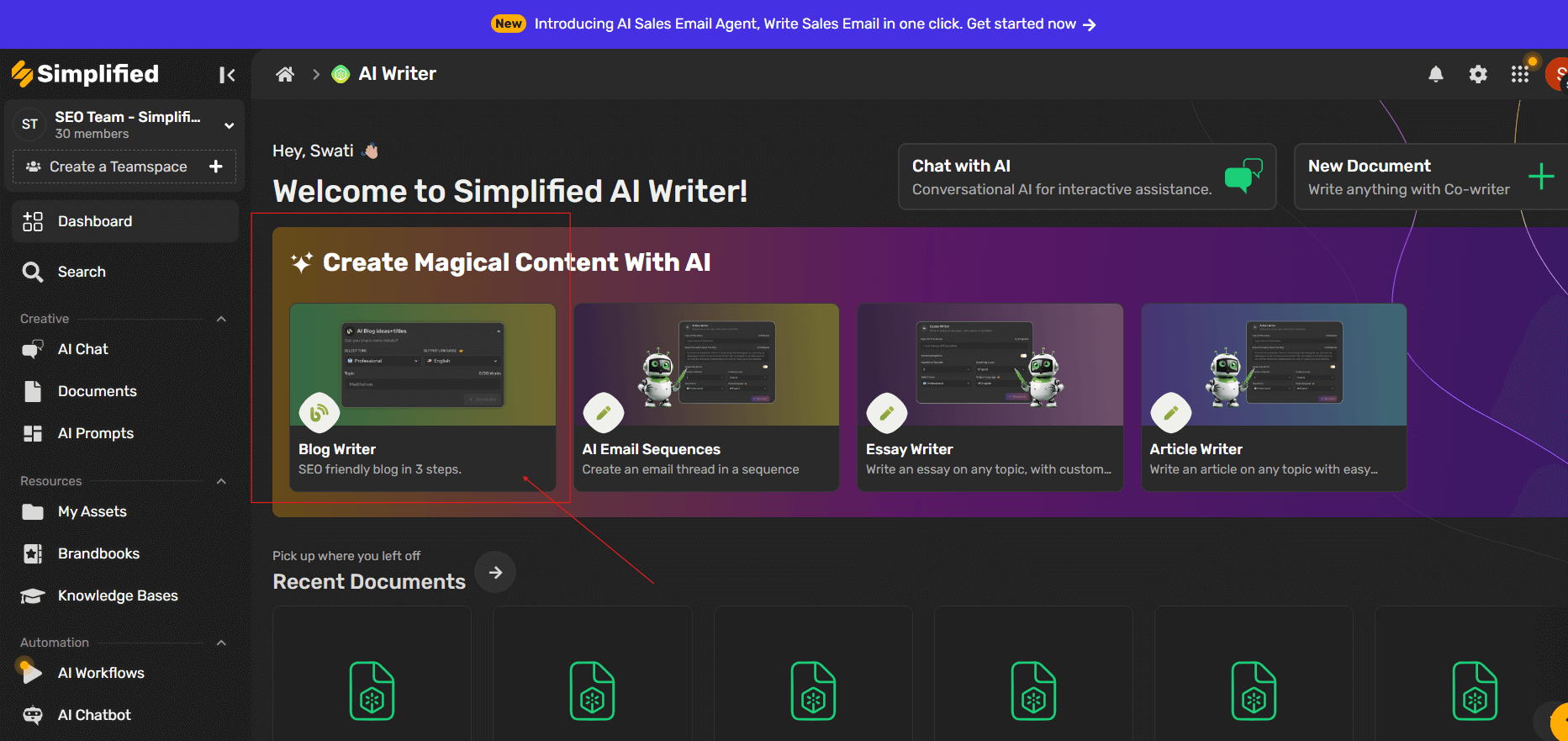
Simplified is one of the best jasper alternatives, offering an all-in-one platform that supports a complete approach to content marketing by combining AI writing, design tools, video creation and editing, and social media management in one place. This setup solves a common issue Jasper users mention—the need to pay for multiple tools to manage different parts of their workflow.
The platform uses advanced AI models to generate various content types, from long-form blog posts to short social media captions. However, what sets Simplified apart is the ability to create visual content and schedule posts without leaving the platform.
Pricing
Simplified offers several pricing tiers to accommodate different needs. The free plan provides basic access to AI writing and design tools with monthly limits. This option works well for testing the platform or handling light content needs.
Paid plans start at significantly lower prices than Jasper. The Pro plan costs $15 per month when billed annually, providing generous word limits and access to all features. For teams, Business plans start at $33 per month per user, including advanced collaboration tools and priority support.
Notably, Simplified doesn’t use a credit system. Instead, you get straightforward word counts that reset monthly, making it easier to predict costs and plan content production.
Key Features of Simplified AI Writer
AI Writing Capabilities: Simplified offers over 80 writing templates covering blog posts, product descriptions, ad copy, email campaigns, and more. The AI adapts to different tones and styles based on your brand guidelines.
The long-form document editor helps you create comprehensive blog posts and articles. Furthermore, the AI can expand outlines, write sections based on bullet points, and rephrase content to match your desired tone.
Wide range of content types — You can generate content in over 80 formats: blogs, articles, social media posts, ads, product descriptions, emails, landing pages, YouTube descriptions, taglines, and more.
Tone and language customization — You can choose from 10+ different tones (formal, conversational, creative etc.) and write in 30+ languages — useful if you’re targeting different audiences globally.
Long-form writing support — The tool supports long-form content creation (blogs, articles, even books), with options like sentence expansion and paragraph generation to help build structured, coherent text.
Rewriting / Rephrasing / Copy Improvement — It includes a copy rewriting or rewriter feature to improve existing text: rewrite sentences, adjust style or tone, enhance readability while preserving meaning.
Plagiarism-free output / Originality checks — Generated content is claimed to be original, with built-in checks to avoid plagiarism.
“Humanized” text output — The AI tends to produce natural, human-sounding content (not “robotic” lines), making the output more engaging for readers.
Multilingual and global reach — Because of language support beyond English, the tool is helpful if you want content in other languages (for example for localizing or targeting non-English demographics).
Template-based workflow for speed and convenience — Using prebuilt templates (for blogs, ads, product copy, emails, social posts) you can generate drafts quickly — good for saving time compared to writing from scratch.
Other Key Features of Simplified
Design Tools: Unlike writing-only platforms, Simplified includes a full graphic design suite. You can create social media graphics, presentations, thumbnails, and marketing materials using thousands of templates. The design tool features drag-and-drop functionality similar to Canva, making it accessible even if you lack design experience.
Social Media Management: The platform includes a complete social media scheduler. After creating your content and graphics, you can schedule posts across multiple platforms including Facebook, Instagram, Twitter, LinkedIn, and Pinterest. Calendar view helps you visualize your content strategy and maintain consistent posting schedules.
Video Creation and Editing: Video creation and editing capabilities let you create short-form videos for social media. You can add text overlays, transitions, and music to create professional-looking content without specialized video software.
Team Collaboration: Multiple team members can work within the same workspace, sharing templates, brand kits, and content calendars. Role-based permissions control who can create, edit, or approve content.
Pros and Cons
Pros:
- All-in-one platform reduces the need for multiple subscriptions
- Lower pricing than many competitors
- No credit system—straightforward word limits
- Includes design and social media tools
- User-friendly interface requires minimal training
- Strong template library for quick content creation
Cons:
- Newer platform with a smaller user community
- Some advanced writing features may be less developed than specialized tools
- Video editing capabilities are basic compared to dedicated video software
Best For
Simplified works exceptionally well for small marketing teams, agencies, and solo creators who handle multiple content types. If you’re currently paying for separate writing, design, and scheduling tools, consolidating to one platform creates significant savings.
The platform particularly suits users who want to produce content quickly without a steep learning curve. Additionally, teams working on social media campaigns benefit from the integrated approach—write, design, and schedule all in one place.
Head-to-Head Comparison: Jasper vs. Simplified
| Aspect | Jasper | Simplified |
|---|---|---|
| Core Focus | Built mainly for writing and marketing copy with strong long-form and brand-voice tools. | All-in-one platform combining AI writing (includes Versatile Content Creation, Brand Tone Customization, AI Text Humanizer, Plagiarism-Free Output, Long-Form Content, Multilingual Support), design, video editing, and social media publishing in a single dashboard. |
| Pricing | Pro plan starts at $59/month (annual) for one user; advanced plans cost more depending on team size and features. | Free plan available. Paid plans start at a much lower entry price. Plans for individual creators begin around $15/month, and team plans are still budget-friendly. |
| Long-Form Writing | Strong long-form editor with project memory, brand voice, and collaboration tools for structured content writing. | Supports long-form content with outline expansion, rewriting, and refinement. Seamlessly switches between writing, design, and planning tools. |
| Templates / Use Cases | 50+ templates covering marketing, SEO, product copy, and branding workflows. | 80+ templates across writing, design, social media, and video projects—more use-case coverage overall. |
| Collaboration & Team Tools | Team permissions, brand voice training, and API integrations designed for marketing teams. | Shared workspace, brand kits, approval workflows, and a built-in content calendar for multi-tool team collaboration. |
| Design & Multimedia | Offers an AI Image Suite for image creation. | Full graphic design editor, video editor, image generation, plus a complete social scheduling suite—much wider creative capability. |
| Ease of Use | Focused experience for writers and marketers; requires learning to fully utilize workflows. | Designed for creators who prefer everything in one place; simpler navigation with fewer tool switches. |
| Value for Money | Premium pricing—best suited for dedicated writing teams and agencies. | Yes, due to multiple tools in one platform, reducing the need for extra subscriptions for design or scheduling. |
2. ChatGPT Plus

ChatGPT Plus isn’t a dedicated writing tool like the other options, but many users consider it a viable Jasper alternative. The conversational AI interface offers flexibility that template-based tools can’t match.
Instead of selecting templates, you provide prompts describing what you need. This approach requires more skill to get optimal results but offers nearly unlimited possibilities once you master prompt writing.
Pricing
ChatGPT Plus costs $20 per month, providing access to GPT-4, faster response times, and priority access during peak hours. This price point sits between budget options like Rytr and premium platforms like Jasper.
However, OpenAI also offers ChatGPT Team ($25 per user per month) and ChatGPT Enterprise (custom pricing) for business users needing admin controls, data protection, and higher usage limits.
The free ChatGPT tier uses GPT-3.5, which produces lower quality output. For professional content creation, the Plus subscription is essentially required.
Key Features
ChatGPT’s conversational interface is its defining feature. You can refine outputs through back-and-forth dialogue, asking the AI to adjust tone, expand sections, or rewrite portions until you’re satisfied.
The memory feature allows ChatGPT to remember information across conversations. You can tell it about your brand, writing style, and preferences once, then reference these in future sessions without repeating context.
Custom GPTs let you create specialized AI assistants trained for specific tasks. For example, you could build a GPT specifically for your blog that knows your style guide, target audience, and topic focus.
Web browsing capability (in Plus and higher tiers) allows ChatGPT to search for current information and cite sources. This feature helps with research-heavy content and ensures accuracy on recent topics.
File upload support lets you provide context documents, brand guidelines, or reference materials. The AI can then generate content based on these inputs, maintaining consistency with existing materials.
Pros and Cons
Pros:
- Flexible conversational interface
- Lower cost than traditional writing tools
- Can handle virtually any content type
- Excellent for brainstorming and ideation
- Continuously improving with updates
- No word or character limits
Cons:
- Requires prompt engineering skills
- No built-in templates for quick generation
- Output saved only in conversation history
- No collaboration features
- Lacks dedicated writing interface
- No direct integration with other tools
Best For
ChatGPT Plus suits experienced content creators comfortable with prompt writing. If you enjoy having control over the creative process and don’t mind spending time crafting effective prompts, ChatGPT offers remarkable flexibility.
The platform also excels for research and ideation. Even if you use another tool for final content creation, ChatGPT helps brainstorm angles, outline articles, and research topics.
Additionally, users already subscribing to ChatGPT Plus for general AI assistance might find it sufficient for their writing needs, eliminating the need for a separate writing tool subscription.
Bonus: The 5 Best AI Writers after ChatGPT (Thoroughly Reviewed and Tested)
3. Writesonic

Writesonic positions itself as a comprehensive AI writing assistant with a focus on SEO optimization. The platform handles both short-form and long-form content while providing tools to improve search rankings.
Built on GPT-4 technology, Writesonic produces high-quality output across various content types. The platform has evolved significantly since launch, adding features like AI article writing, image generation, and even an AI chatbot builder.
Pricing
Writesonic uses a credit-based pricing model, which may frustrate users leaving Jasper for the same reason. However, the credits typically stretch further than Jasper’s system.
The free trial provides 10,000 words to test the platform. Paid plans start at $16 per month for 100,000 words when billed annually. The Professional plan at $33 per month includes unlimited words and access to all features.
Importantly, Writesonic offers a “quality” toggle. Lower quality settings consume fewer credits but produce less refined output. Higher quality settings use more credits but generate superior content. This flexibility lets you balance quality with budget constraints.
Key Features
The SEO-focused article writer represents Writesonic’s standout feature. You input a topic or keyword, and the AI researches top-ranking content, then generates an optimized article based on that analysis. Furthermore, it suggests keywords, meta descriptions, and content structure.
Sonic Editor provides a Google Docs-like interface for long-form content. You can write, edit, and expand content with AI assistance. The AI can continue writing from your cursor position, rephrase sections, or expand bullet points into full paragraphs.
The platform includes Photosonic, an AI image generator. This addition helps you create custom images for blog posts and social media without leaving the platform or purchasing stock photos.
Chatsonic, their AI chatbot, functions similarly to ChatGPT but with internet access for current information. You can use it for research, content ideation, and quick questions during your writing process.
Pros and Cons
Pros:
- Strong SEO optimization features
- Supports both short and long-form content well
- Built-in image generation
- Competitive pricing with unlimited options
- Quality toggle provides cost control
Cons:
- Credit system can be confusing
- Interface feels busy with many features
- Some features work better than others
- Learning curve to use all capabilities effectively
Best For
Writesonic works best for content marketers and bloggers focused on SEO. If driving organic traffic is your primary goal, the SEO article writer and optimization features provide significant value.
The platform also suits users who want a middle-ground option—more features than basic tools but less complexity than enterprise platforms. Additionally, the unlimited plan appeals to high-volume content creators who found Jasper’s pricing prohibitive.
Bonus: Writesonic vs Simplified: The Battle of AI Content Generators
4. Copy AI

Copy.ai focuses specifically on short-form content and marketing copy. The platform excels at generating product descriptions, ad copy, social media posts, and email subject lines. However, it offers less robust support for long-form content compared to some alternatives.
The tool emphasizes speed and simplicity. Users can generate multiple variations of copy quickly, then select and refine their favorites. This approach works well for marketers running A/B tests or creating multiple campaign variations.
Pricing
Copy.ai provides a free plan with limited monthly word generation. This tier includes access to all templates but restricts output volume.
The Pro plan costs $49 per month when billed annually. This tier removes word limits and adds features like tone control and longer output lengths. For teams of five or more, enterprise pricing is available with custom features and dedicated support.
Compared to Jasper, Copy.ai offers better value for small teams. However, the pricing sits above some other alternatives, particularly for solo users who don’t need unlimited generation.
Key Features
Copy.ai includes over 90 templates targeting specific marketing use cases. The platform organizes these by category—social media, website copy, email, sales, and e-commerce—making it easy to find the right template.
The workflow editor lets you chain multiple AI operations together. For example, you could generate a product description, then automatically create social media posts based on that description. This automation saves time when creating campaign assets.
Brand voice customization allows you to define your company’s tone and style. Subsequently, the AI applies these preferences across all generated content, maintaining consistency.
The platform recently added long-form document support, though this feature feels less mature than the short-form capabilities. You can create blog posts and articles, but the experience isn’t as refined as dedicated long-form tools.
Pros and Cons
Pros:
- Excellent for short-form marketing copy
- Fast generation with multiple variations
- Strong template selection for specific use cases
- Workflow automation saves time on repetitive tasks
- No word limits on paid plans
Cons:
- Long-form writing capabilities lag behind competitors
- Higher pricing than some alternatives
- Limited features beyond writing
- Interface can feel cluttered with many template options
Best For
Copy.ai suits marketing teams focused primarily on ads, social media, and e-commerce copy. If you spend most of your time creating product descriptions, ad variations, and social posts rather than long articles, this tool delivers strong results.
The platform also works well for teams running extensive A/B tests. The ability to quickly generate multiple variations of headlines, CTAs, and ad copy speeds up campaign development significantly.
Bonus: 8 Of The Best Copy AI Alternatives You Need To Know About
5. Rytr

Rytr takes a minimalist approach to AI writing. The platform offers fewer bells and whistles than competitors but delivers solid writing performance at the most affordable price point in this comparison.
The straightforward interface gets you writing quickly without extensive setup or configuration. While it lacks advanced features, this simplicity appeals to users who want AI assistance without overwhelming complexity.
Pricing
Rytr’s pricing structure makes it the most budget-friendly option reviewed here. The free plan includes 10,000 characters per month—enough to test the platform and handle occasional writing needs.
The Saver plan costs just $9 per month for 100,000 characters monthly. The Unlimited plan at $29 per month provides unlimited character generation and access to all features. These prices remain constant whether you pay monthly or annually, though annual billing saves 20%.
Compared to Jasper’s entry price of $39-$49 per month, Rytr offers significant savings. For freelancers and small businesses watching expenses carefully, this affordability makes Rytr worth considering.
Key Features
Rytr covers 40+ use cases including blog posts, emails, social media content, and business documents. While this selection is smaller than platforms offering 90+ templates, it covers the most common content types effectively.
The tone selector lets you adjust output style—you can generate content that sounds professional, casual, urgent, or humorous. This flexibility helps match content to different audiences and platforms.
Built-in plagiarism checking verifies that generated content is original. This feature provides peace of mind, particularly when creating content for clients or publications with strict originality requirements.
The Chrome extension lets you access Rytr within Gmail, Google Docs, and other web applications. Consequently, you can generate content without switching between tabs or applications.
Multiple language support covers 30+ languages, making Rytr useful for international content needs. However, English generates the best results, as with most AI writing tools.
Pros and Cons
Pros:
- Most affordable pricing in this comparison
- Simple, intuitive interface
- Built-in plagiarism checker
- Chrome extension for convenient access
- Unlimited plan at reasonable cost
Cons:
- Fewer templates than competitors
- Limited advanced features
- Output quality can be inconsistent
- Less suitable for complex long-form content
- Smaller user community and fewer resources
Best For
Rytr suits budget-conscious users who need AI writing assistance but don’t require advanced features. Freelancers just starting out, small business owners handling their own marketing, and students can all benefit from the affordable pricing.
The platform also works well as a supplementary tool. If you have a primary writing platform but occasionally need extra capacity or want a backup option, Rytr’s unlimited plan provides good value.
Bonus: Rytr vs Simplified (A Comprehensive Comparison)
6. Anyword

Anyword specializes in data-driven copywriting with built-in performance prediction. The platform stands out by scoring every piece of generated content based on how well it’s likely to perform before you publish it. However, this analytical approach creates a steeper learning curve compared to simpler alternatives.
The tool emphasizes measurable results over pure content volume. Users can generate multiple copy variations, review performance predictions for each, then choose the options most likely to drive conversions. This approach works particularly well for performance marketers optimizing campaigns based on data rather than intuition.
Pricing
Anyword provides a Starter plan with 1,000 words per month to test basic functionality. This tier includes access to performance scoring but restricts generation volume significantly.
The Data-Driven plan costs $49 per month when billed annually. This tier provides 30,000 words monthly and includes full access to performance predictions, copy analytics, and all content types. The Business plan starts at $99 per month, offering 100,000 words plus custom AI models and team features. For larger organizations, Enterprise pricing is available with unlimited words and dedicated support.
Compared to Jasper, Anyword offers similar pricing but adds performance analytics that other tools lack. However, the word limits on lower tiers sit below some competitors, making it less suitable for high-volume content production.
Key Features
Anyword includes performance prediction scores for every generated variation. The AI analyzes billions of historical marketing data points to estimate how copy will perform, helping you choose winners before running tests.
The copy intelligence dashboard analyzes your existing marketing content across channels. It identifies what’s working, spots inconsistencies, and suggests improvements to align messaging with top performers.
Brand voice training lets you upload existing content to create custom AI models. Subsequently, the platform generates copy that matches your specific tone, style, and messaging guidelines across all content types.
Target audience personas allow you to create detailed customer profiles. The AI then generates copy optimized for each segment’s preferences, pain points, and communication style.
Channel-specific optimization tailors content for different platforms. The AI adjusts copy based on what performs best on Facebook ads versus Google ads versus email campaigns, accounting for each channel’s unique characteristics.
The platform supports over 100 marketing copy types organized by use case—ads, landing pages, product descriptions, email campaigns, and social media. However, long-form blog content receives less attention than short-form marketing materials.
Pros and Cons
Pros:
- Performance predictions reduce guesswork in copy selection
- Data-driven approach improves campaign results over time
- Strong analytics provide strategic insights beyond content generation
- Custom AI models maintain brand consistency effectively
- Excellent for optimizing conversion-focused copy
- Reduces time spent on manual A/B testing
Cons:
- Higher learning curve due to analytics features
- Word limits feel restrictive on lower-tier plans
- Less effective for brand-new campaigns without historical data
- Long-form content capabilities lag behind competitors
- Pricing sits at the higher end for solo users
- Requires ongoing analysis to maximize platform value
Best For
Anyword suits performance marketing teams focused on ROI and conversion optimization. If you run continuous testing programs and make decisions based on data rather than gut feeling, the performance predictions provide significant value
Bonus: 15 Best AI Marketing Tools for Small Businesses (Tested & Reviewed)
Comparison Table of Top Jasper Alternatives
| Tool Name | Best Suited For | Price Range | Long-Form Writing | Template Count | Team Tools | Additional Features |
|---|---|---|---|---|---|---|
| Simplified | Creators, marketers, and small teams needing an all-in-one platform | Free plan; paid plans from ~$15/month (annual) | Strong long-form editor with outline expansion | 80+ templates | Shared workspace, permissions, brand kits | All-in-one platform combining AI writing (includes Versatile Content Creation, Brand Tone Customization, AI Text Humanizer, Plagiarism-Free Output, Multilingual Support), design, video editing, and social media publishing in a single dashboard |
| ChatGPT Plus | Experienced writers and users comfortable with detailed prompting | $20/month | Excellent long-form when guided by prompts | No templates (prompt-based) | Team tools on higher plans only | Web browsing, custom GPTs, file uploads, coding, research tools |
| Writesonic | SEO-driven bloggers and content marketers | Free trial; paid plans from ~$16/month (annual) | Robust long-form SEO writer | Large SEO & marketing template library | Team access on upper tiers | Image generator, Sonic Editor, Chatsonic |
| Copy.ai | Marketing teams focused on short-form content & ads | Free plan; Pro at $49/month (annual) | Basic long-form; requires editing | 90+ templates | Limited; enterprise only | Workflow automation, brand voice settings |
| Rytr | Budget users, freelancers, students | $0–$29/month | Basic long-form, suitable for simple articles | 40+ use cases | Minimal | Plagiarism checker, Chrome extension |
| Anyword | Performance marketers focused on conversions | Starter & paid plans from $49/month (annual) | Weak long-form; best for short-form marketing | 100+ marketing categories | Available on Business & Enterprise plans | Predictive scoring, persona targeting, copy intelligence |
Final thoughts
Choosing the right AI writing tool comes down to what matters most in your daily workflow—reliable output, fair pricing, and features that genuinely support your projects. Jasper remains a familiar name, but user feedback shows that many writers and teams want tools that feel easier to use, more consistent, and better aligned with their budget. The alternatives in this guide offer different strengths, from all-in-one platforms to focused writing assistants. By comparing real experiences, practical features, and overall value, it becomes clearer which option fits your needs today and can support your long-term content goals.
Ready to try a tool that supports your full content workflow?
Give Simplified’s AI writer a try and see how writing, design, and planning come together in one place. It’s built to help creators, marketers, and teams handle daily content tasks without switching between multiple apps. You can start with the free plan and explore everything at your own pace.